
Good solutions.
No mystery pricing.
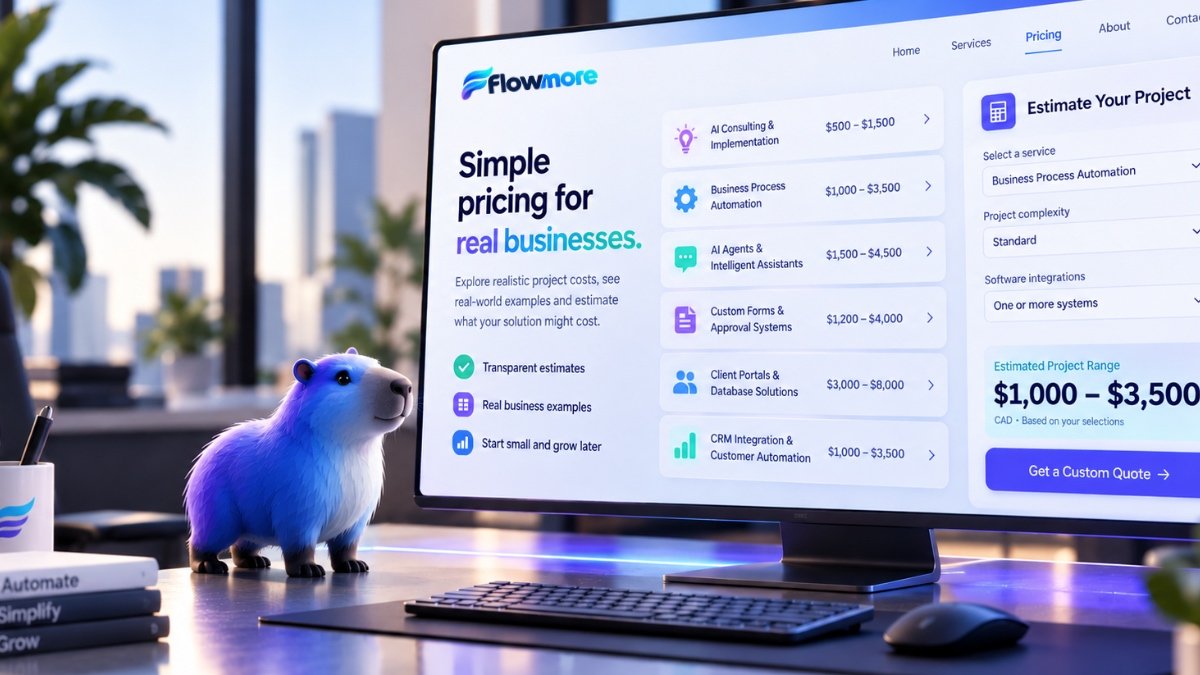
Wondering how much AI automation costs? You’re not alone. Explore realistic project budgets, see practical business examples and estimate what your own solution might cost. No sales pitch required.
You should have an idea of the cost before asking for a quote.
Many AI automation agencies don’t publish prices because every project is different. That’s understandable, but it doesn’t help a small business owner trying to decide whether automation is affordable.
At Flowmore, we believe you should be able to explore realistic starting budgets before contacting us. The examples below show what different types of projects may cost, what could be included and what affects the price.
Understand the approximate investment before you inquire.
See how everyday businesses could use each solution.
Begin with one useful workflow and expand when it makes sense.
Six services. Six realistic starting budgets.
These illustrative scenarios help you understand how AI automation pricing works for businesses and organizations of different sizes, whether you’re based in Toronto, elsewhere in Canada or beyond.
AI Consulting & Implementation
For businesses that know AI could help but aren’t sure where to begin or which tools are worth using.
- Discovery discussion and workflow review
- Identification of practical AI opportunities
- Recommended tools and implementation priorities
Business Process Automation
For businesses spending too much time copying information, sending reminders and managing repetitive administrative tasks.
- Workflow mapping and automation setup
- Basic software connections where supported
- Testing and handover guidance
AI Agents & Intelligent Assistants
For businesses that receive repetitive customer questions and want to improve their response process outside regular office hours.
- Assistant configuration and knowledge setup
- Common inquiry and lead-capture workflows
- Testing and escalation planning
Custom Forms & Approval Systems
For organizations that need more than a basic contact form, including applications, document collection and review workflows.
- Custom multi-step form configuration
- Structured submission and review workflow
- Notifications and appropriate access planning
Client Portals & Database Solutions
For businesses that want clients or authorized users to access documents, account information and service requests in one organized place.
- Portal structure and account setup
- Document or request management features
- Permissions and database planning
CRM Integration & Customer Automation
For businesses that want their website, customer inquiries and CRM to work together instead of operating as separate systems.
- CRM workflow review and field mapping
- Supported form-to-CRM integration
- Basic notification and follow-up automation
Explore Solutions by Industry →
Pricing examples are indicative project budgets in Canadian dollars, before applicable taxes. They are not fixed offers. Actual quotes depend on scope, platform capabilities, integrations, security requirements and complexity. Third-party software, API usage, hosting and ongoing maintenance may be charged separately.
What might your project cost?
Select the type of solution you’re considering and a few details about the scope. We’ll show you a preliminary budget range to help you plan.
This is a preliminary planning estimate, not an automated quote. Actual pricing depends on requirements and may fall outside this range. Software subscriptions, usage and maintenance are not included.
Discuss This Project →What affects AI automation pricing?
Two projects with similar names can have very different requirements. These are some of the factors that influence the final cost.
Workflow Complexity
A simple notification is different from a multi-step process with conditional rules, approvals and exceptions.
Software Integrations
Connecting existing systems may require APIs, paid integrations, custom development or additional testing.
Customization
Off-the-shelf functionality can be more affordable than building custom interfaces, databases or business logic.
Security & Permissions
Sensitive documents, multiple user roles and regulated information may require more advanced safeguards.
Software & Usage Fees
AI APIs, CRM subscriptions, automation platforms, hosting and storage can introduce ongoing costs.
Support & Maintenance
Some projects need only occasional updates. Others benefit from ongoing monitoring, improvements and support.
What’s the difference between a $1,000 workflow and a $6,000 system?
Both can be useful. The right investment depends on the problem you’re solving.
A simpler $1,000 project
An illustrative setup using existing tools and a straightforward workflow.
- Connect one website form to a supported CRM
- Map basic customer information
- Send an internal notification
- Create a simple follow-up task
- Test the workflow and provide handover guidance
A more involved $6,000+ project
A broader implementation with additional systems, rules and testing requirements.
- Connect several business applications
- Handle conditional lead routing
- Support multiple user roles or teams
- Create more detailed reporting workflows
- Include broader testing and documentation
Start small. Automate more later.
You don’t need to automate your entire business at once. Often, the best approach is to begin with one repetitive task that’s costing your team time, test the solution and expand when the benefits become clear.
Flowmore can help you prioritize practical opportunities and build toward a more connected business without taking on unnecessary complexity.
AI automation pricing FAQs
How much does AI automation cost in Toronto?
A focused business automation project may start around $1,000 CAD, while more involved implementations can cost several thousand dollars or more. The price depends on the number of workflows, integrations, customization and security requirements. Flowmore provides project-specific quotes after reviewing your needs.
How much does AI consulting cost for a small business?
A focused AI consulting assessment at Flowmore may start around $500 CAD. A more detailed review, implementation roadmap or hands-on technical engagement may cost more.
How much does an AI chatbot or AI assistant cost?
A basic AI assistant implementation may start around $1,500 CAD. More advanced assistants involving custom knowledge sources, integrations, workflows or voice capabilities may require a larger budget. AI platform and usage fees may also apply.
Is business automation a one-time cost or a monthly fee?
Flowmore may charge a one-time implementation fee for a defined project. Depending on the solution, you may also have recurring costs for software, hosting, API usage, maintenance or ongoing support. These should be identified separately in your quote.
How much does CRM integration cost?
A straightforward CRM integration or lead follow-up workflow may start around $1,000 CAD. More complex integrations involving multiple systems, data migration or custom automation rules can cost more.
Can I start with one automation and add more later?
Yes. Starting with one well-defined workflow is often a practical approach. Additional processes can be planned and implemented as your needs evolve.
Are software subscriptions included in your prices?
Not necessarily. Third-party software subscriptions, AI API usage, CRM licenses, hosting and other recurring charges are generally separate unless specifically included in a written quote.
Do you work with businesses outside Toronto?
Yes. Flowmore is based in Toronto, Ontario, and works remotely with businesses and organizations across Canada and internationally. Our AI consulting, automation and digital solutions can be planned and implemented remotely, making location less of a barrier.
Have a project in mind? Let’s see what it really needs.
Tell us what’s taking too much time, which tools you’re using and what you’d like to improve. We’ll help you explore a realistic starting point.
Let’s Talk About Your Project →